SOS Emergency Bracelet Silicone Black – QR Code & Swiss Data Platform
search
  • SOS Emergency Bracelet Silicone Black – QR Code & Swiss Data Platform
  • SOS Emergency Bracelet Silicone Black – QR Code & Swiss Data Platform

Free shipping from CHF 50.–

We cover packaging and delivery costs for orders over CHF 50.–.

Personal customer support

We answer your questions personally – no automated chatbots.

30-day return policy

You receive a 30-day return or exchange guarantee.

Swiss data platform

Your data is stored securely and reliably in Switzerland.

How it works

Ready in 3 simple steps

Choose and buy your product

Select the right pet tag, colour and variant for your pet.

Scan and activate the QR code

After receiving it, scan the QR code and activate your digital pet ID.

Manage your data in the WebApp

Configure contact and emergency data and update it anytime.

SOS Emergency Pocket Card with Skimguard and QR Code - Swiss Data Platform

CHF 18.41
Free shipping from CHF 50.– Shipping from Swiss warehouse One-time payment No subscription No app required
Quantity
Available

SOS Emergency Card · QR Code · SkimGuard

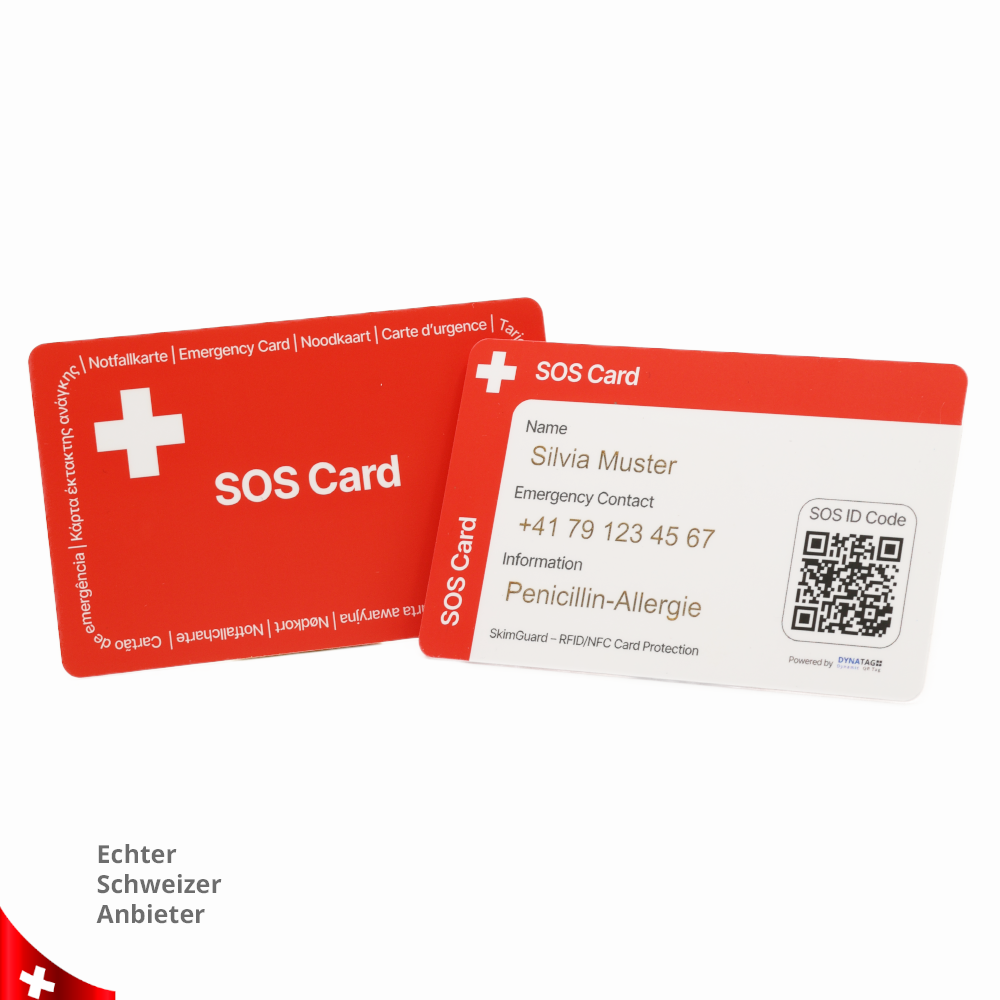
Practical SOS emergency card in credit card format with an individual QR code for fast access to important emergency contacts, health data and personal SOS information. In addition, the integrated SkimGuard function protects your bank and credit cards against unauthorised scanning. Simply place it in your wallet, scan it in an emergency and alert contact persons – without any app.
Works with any smartphone.

QR code with digital SOS profile: important emergency information can be accessed online at any time
Emergency contacts can be alerted instantly: quickly inform family, friends, doctors or caregivers
Store health data: save allergies, medication, medical conditions or notes for first responders
Optional location sharing: finders can transmit their location to contact persons
SkimGuard protection: protects bank and credit cards against unauthorised scanning
Credit card format: fits easily into any wallet
Robust card: water-resistant, durable and completely maintenance-free
Swiss data platform: secure management of your SOS data on the DynaTag platform
No app required and no monthly fees

Double safety in your wallet.
The SOS emergency card combines fast medical assistance via QR code with additional SkimGuard protection for your bank and credit cards.

SOS QR Code

Fast access to important emergency information

Emergency Contacts

Contact persons can be informed directly

Health Data

Store allergies, medication and notes for first responders

Location Sharing

Finders can optionally transmit their current location

SkimGuard Protection

Protects bank and credit cards against unauthorised scanning

Credit Card Format

Fits easily into your wallet, bag or card holder

Maintenance-Free

No battery, no electronics and no running costs

No App Needed

Works directly in the browser with any smartphone

Swiss Data Platform: Secure management of your SOS data on the DynaTag platform

Product customization

Don't forget to save your customization to be able to add to cart
  • 250 char. max
  • 250 char. max
  • 250 char. max
SOS Emergency Card with QR Code

Fast Help in an Emergency – with QR Code, Skimguard and Swiss Data Platform

This SOS emergency card in practical credit card format fits into any wallet and helps to quickly identify the wearer in the event of a medical emergency, accident or critical situation.

The most important basic data can be written directly on the card. Additional emergency contacts, health data and important information can be accessed at any time via the individual QR code with a smartphone – without downloading an app.

At the same time, the card also works as a Skimguard card to help protect bank and credit cards. For optimal protection, the SOS card should be placed as close as possible to the bank or credit cards in the wallet.

✔ QR code scannable with any smartphone
✔ Emergency contacts and health data instantly accessible
✔ Important basic data can be written directly on the card
✔ Skimguard function to help protect bank and credit cards
✔ Fits into any wallet in credit card format
✔ Secure data storage in Switzerland
✔ No app, no electronics and no batteries required
SOS emergency card with QR code and SkimguardDigital SOS emergency card with QR code and Swiss data platform

Features

  • QR code scannable with any smartphone
  • Emergency contacts easy to access and contact
  • Display important health data such as allergies, medication, diets or vaccinations
  • Personal data such as height, weight or important notes can be stored
  • Important basic information can be written directly on the card
  • Location sharing by the assisting person possible
  • Google Maps support for better orientation
  • Automatic URL link forwarding by e-mail to contacted persons possible
  • All data can be updated at any time via smartphone, tablet or PC
  • Innovative noticeboard for photos and real-time messages
  • Skimguard function to help protect bank and credit cards
  • Compact credit card format for wallet, card holder or ID sleeve
  • No electronics or batteries required
  • Data storage in Switzerland

Applications

  • Emergency card for the wallet
  • Medical emergency information on the go
  • Sports activities
  • Travel and excursions
  • Patients in care facilities
  • Elderly people
  • Patients with long-term medication
  • People with pre-existing conditions
  • High-risk patients
  • People with special health needs
  • Daycare centres and after-school care
  • Additional protection for bank and credit cards

WebApp – directly in the browser

After scanning the QR code, the DynaTag WebApp opens directly in the smartphone browser. No additional app needs to be installed. Rescue workers, doctors or assisting persons can immediately view the shared information.

The wearer decides during configuration which data should be displayed. Emergency contacts, health information, personal details and important notes can be updated at any time via the personal user account.

Cloud-based data storage in Switzerland ensures that the data is stored securely and reliably. Changes can be made conveniently via smartphone, tablet or PC.

  • Individual cover image for quick recognition
  • Emergency contacts with name and phone number directly callable from the WebApp
  • Health data displayed clearly and structurally
  • Share location at the touch of a button
  • Multiple contact persons possible
  • Noticeboard for photos and real-time messages
  • Intuitive menu bar at the bottom of the screen
Test WebApp live
DynaTag SOS WebApp for emergency card with QR code

Test Me

Discover the functions live on your smartphone. Scan the QR code or use the button to test the digital SOS WebApp directly.

DynaTag SOS emergency card QR code example

Digital Emergency View

All shared information is displayed in a mobile-friendly, clear and easy-to-understand way – so help can be provided quickly in an emergency.

Digital view of the DynaTag SOS WebApp

Credit Card Format with Skimguard Function

The SOS emergency card is compact, lightweight and fits into any wallet. The most important information can be written directly on the card, while more detailed data remains digitally accessible via the WebApp.

The card also includes a Skimguard function. It should be kept as close as possible to bank or credit cards to help protect them in everyday use against unwanted reading or misuse.

  • Practical credit card format
  • Fits into wallet, card holder or ID sleeve
  • Writable emergency fields directly on the card
  • QR code for digital emergency information
  • Skimguard function for additional card protection
  • No battery, no electronics and no charging required
  • Ideal for everyday use, travel, care and medical emergency situations
SOS emergency card with QR code and Skimguard in credit card format

E-mail Alerting

Important contact persons such as family, friends, doctors or caregivers can be contacted directly from the WebApp after the QR code has been scanned.

  • Emergency contacts immediately reachable
  • URL link can be automatically forwarded by e-mail
  • Multiple contact persons can be stored
  • Fast sharing of emergency data possible

Real-Time Noticeboard

The integrated noticeboard enables the exchange of photos and text messages between all involved persons without having to exchange contact details beforehand.

  • Exchange photos and messages in real time
  • No registration required for the noticeboard
  • Access for persons with QR code or URL link
  • Helpful for coordination in an emergency

Product Video

Important: An active internet connection is required to access the digital emergency data and contact information. The SOS emergency card contains no battery and does not need to be charged. For the Skimguard function, the card should be placed as close as possible to the bank or credit cards in the wallet.

Product Reviews

Comments (0)

Frequently Asked Questions FAQ

For more information, visit our blog or follow us on social media.

What exactly is the SOS emergency wristband with QR code?

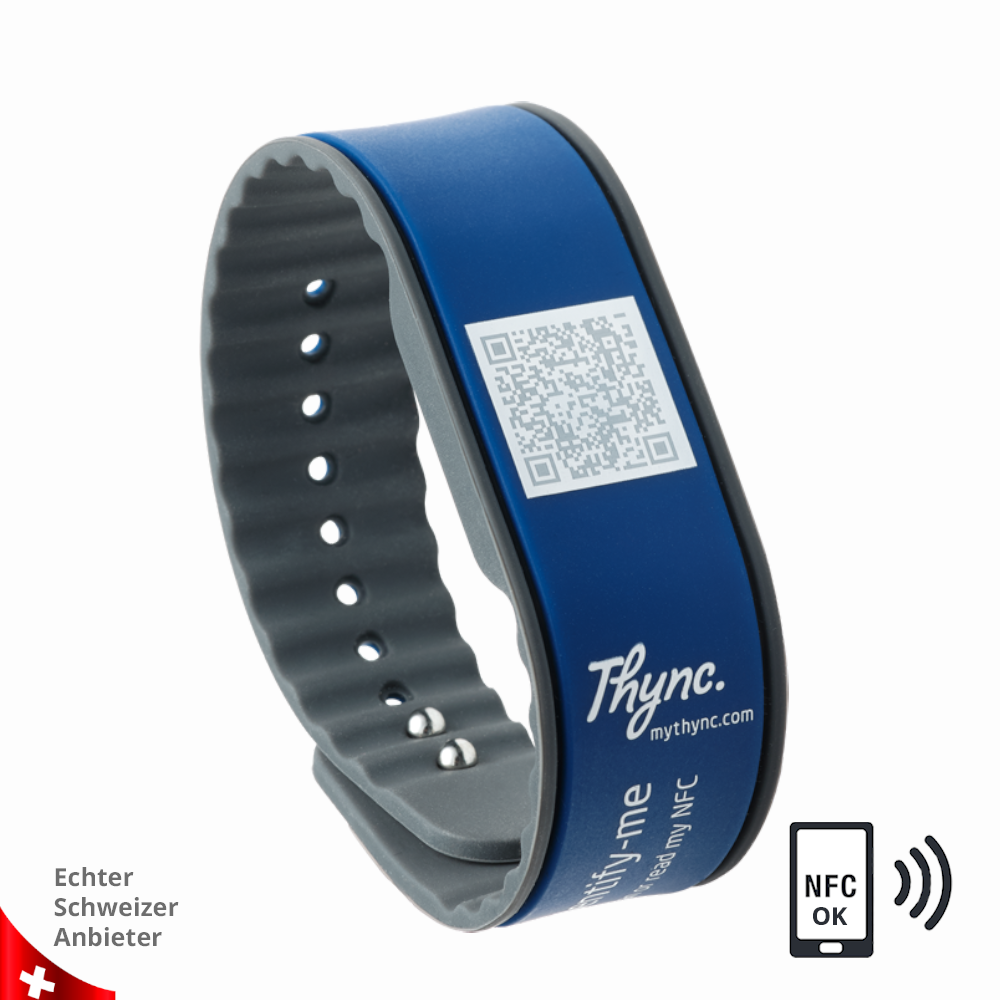
Our SOS emergency wristband is a modern silicone wristband with a high-quality, double-secured metallic clasp. The engraved QR code on the metal clip links to a personal emergency web app containing essential information such as medical data, emergency contacts, and even a pinboard where all involved parties can exchange images and text messages in real time without registration.

By scanning the QR code, a finder or emergency responder (e.g., in a crisis) can access the following information:

  • Emergency contacts
  • Personal details for clear identification of the injured person (e.g., profile picture, age, gender)
  • Important medical data (e.g., allergies, medications, vaccinations)
  • Location tracking of the finder’s smartphone and transmission to the emergency contact
  • A virtual pinboard for uploading and sharing images

Privacy is our top priority. All data stored with us is strictly confidential and will never be analyzed or shared with third parties.

You have full control over which information is visible when the QR code is scanned.

We recommend storing sensitive data separately or sharing it personally with your emergency contact in advance.

An additional password protection feature will be available soon.

When the QR code is scanned, your personal emergency page automatically opens in the smartphone's browser—no additional app is required. The location of the person who scanned the code can also be detected and shared (legal consent from the finder is required). This way, loved ones can see where you were last located. Ideal for emergencies or individuals with dementia.

Yes! With your purchase, you’ll receive free access to your personal user account (created during activation). From there, you can update information remotely at any time, upload new images, or modify existing details—easily from your smartphone, tablet, or computer.

No! With your purchase, your SOS emergency wristband can be used without any additional costs for a full 5 years. After that, it can be extended for another 5 years with a one-time renewal fee.

Additional premium features will soon be available through a subscription. Sign up for our newsletter to stay informed about new features and updates.

Application & Replacement Card

User Guide

The online user guide and frequently asked questions for the DynaTag SOS emergency card can be accessed at any time directly via the main menu in the WebApp.

There you will find information about activation, configuration, data management, emergency contacts, the location function and use of the digital noticeboard.

Alternatively, you can open the user guide directly using the following button:

Open User Guide
DynaTag user guide in the SOS WebApp

Tip: Open the WebApp faster

Make it easier to access your stored emergency data without having to scan the QR code again each time. Simply save your DynaTag WebApp directly to your smartphone or tablet.

  • Scan the QR code once
  • Open the WebApp in the browser
  • Add it to your home screen
  • Direct access just like an app
  • Update data conveniently at any time

Android & Apple

On Android devices, the WebApp can be added to the home screen via the browser menu.

On iPhone and iPad, the WebApp can be saved via the share icon and the “Add to Home Screen” function.

  • No app installation required
  • No repeated searching or scanning needed
  • Fast access to the personal user account
  • Ideal for updating contacts and health data

Activation and Configuration

The SOS emergency card can be configured with a smartphone in just a few moments. After scanning the QR code, the card can be connected to a personal user account and set up individually.

The wearer decides which information should be displayed in an emergency. This keeps personal data under control and allows it to be updated at any time.

  • Scan the QR code and open the WebApp
  • Create a personal user account or log in
  • Add emergency contacts
  • Store health data and important notes
  • Add an individual cover image
  • Update data at any time via smartphone, tablet or PC
Configure SOS emergency card with QR code

Using the SOS Emergency Card

The SOS emergency card fits into any wallet and should be carried in a clearly visible place. The most important basic data can be written directly on the card.

For the Skimguard function, the card should be placed as close as possible to the bank or credit cards in the wallet. This allows it to be used as an additional protective card in everyday life.

  • Carry it in your wallet or ID sleeve
  • Write important basic data directly on the card
  • Keep the QR code clearly visible and readable
  • Place it as close as possible to bank or credit cards
  • Regularly check that the card is still easy to read
Using the SOS emergency card with QR code and Skimguard

Cleaning and Care

Protect the integrated QR code and the card surface from strong mechanical impact such as scratches, bending or heavy abrasion.

If necessary, the card can be cleaned with a soft, slightly damp cloth. Avoid aggressive cleaning agents, solvents and prolonged contact with chemical substances.

Check the QR code regularly for good readability, especially if the card is frequently used in a wallet, bag or while travelling.

Do not bend, cut or clean in the washing machine.

If the QR code still becomes unreadable or the card is lost, the stored data can continue to be used with a replacement card with the same QR code.

Cleaning and care of the SOS emergency card with QR code

Replacement Card with the Same QR Code

There are no classic accessories for the SOS emergency card. If the card is damaged, lost or the QR code is no longer clearly readable, a replacement card with the same QR code can be ordered.

This means the existing data remains available and does not need to be entered again. The replacement card is linked again to the same digital DynaTag SOS page.

  • Replacement card with the same QR code possible
  • Existing emergency data remains available
  • No need to enter the data again
  • Ideal in case of loss, damage or unreadable QR code
  • Continued use of the existing DynaTag SOS page
Request Replacement Card

Note about this Variant

This SOS emergency card contains an individual QR code for access to the digital DynaTag SOS page and additionally includes a Skimguard function for bank and credit cards.

The stored information can be updated at any time via the WebApp. This includes emergency contacts, health data, personal details and important notes for medical emergencies.

  • QR code: access to the digital DynaTag SOS page
  • Format: practical credit card format
  • Skimguard: additional protection for bank and credit cards
  • Replacement: replacement card with the same QR code possible
  • Data: secure storage on the Swiss DynaTag platform
  • Technology: no battery, no electronics and no charging required

In an Emergency

When the QR code is scanned, shared emergency data can be displayed directly in the browser. This helps assisting persons quickly identify who to contact and which information is important.

  • Scan the QR code with a smartphone
  • View shared emergency data
  • Call the contact person directly
  • Share location if needed
  • Use the noticeboard for messages or photos

Important for the Wearer

To ensure that the SOS emergency card can provide optimal help in an emergency, the stored data should be checked regularly and kept up to date.

  • Keep phone numbers up to date
  • Regularly check medication and allergies
  • Update emergency contacts when changes occur
  • Check the QR code for readability
  • Carry the card clearly visible in your wallet
Important: An active internet connection is required to access the digital emergency data and contact information. The SOS emergency card contains no battery and does not need to be charged. For the Skimguard function, the card should be placed as close as possible to the bank or credit cards in the wallet.
TPCA-0006A1
93 Items

Data sheet

Colors
Red
Material
PVC – Polyvinyl Chloride
Gender
Unisex
Storage Capacity
10MB
Storage Duration
5 Years
WebApp Typ
SOS
EAN Code

Specific References

EAN13
4262465371323
Shipping Information

Fast and reliable shipping with Swiss Post

We ship your order directly from Switzerland with reliable delivery. Shipping costs are automatically calculated during checkout.

🇨🇭

Switzerland & Liechtenstein

Shipping via Swiss Post (A-Post or B-Post). Free delivery for orders over CHF 50.

🚚

Delivery Time

In-stock items are usually processed within 1–2 business days after payment is received.

🌍

International Shipping

International deliveries are handled via Swiss Post. Customs duties, VAT and handling fees are paid by the recipient.

Shipping Costs

B-Post Economy CHF 5.00 under CHF 50
A-Post Premium CHF 9.00 under CHF 50
Free Shipping From CHF 50

Processing & Delivery

In stock:
Processing within 1–2 business days after payment.
Estimated delivery: 2–5 business days (Mon–Fri).

Out of Stock

Out-of-stock items are reordered immediately after purchase. Delivery is usually completed within 30 days.

Order Cut-off Time

Orders placed before 12:00 (CET / Zurich) and paid are usually processed the same business day.

Tracking

For A-Post+ shipments, you will receive a tracking number with your shipping confirmation to track your parcel via Swiss Post.

Address Changes

Please ensure your shipping address is correct during checkout. Changes are only possible before the order has been processed or shipped.

Damaged Parcels

If your parcel arrives visibly damaged, report it immediately upon delivery and contact us within 48 hours with photos.

International Deliveries

For deliveries outside Switzerland and Liechtenstein, additional charges such as customs duties, VAT and handling fees may apply. These costs must be paid directly to the shipping provider.

Questions about shipping?

Our customer service team will be happy to assist you: support@dynatag.com

Personal Customer Service

We’re here to help you quickly and personally

Whether it’s your order, personalization, QR code, WebApp or delivery – our customer service team supports you directly from Switzerland.

💬

Personal Support

We answer your questions quickly, reliably and individually – no anonymous call center.

🚚

Shipping from Switzerland

All products are shipped directly from our Swiss warehouse – no imports, no dropshipping.

🔐

Secure Data Platform

Your DynaTag WebApp and customer data are securely managed on our Swiss-based platform.

Would you like to contact us directly?

Use our contact form for questions about orders, personalization, delivery or QR code / WebApp.

Go to contact form

Correspondence Address

DynaTag AG
c/o Domizilagentur GmbH
Badenerstrasse 580
8048 Zurich
Switzerland

Return Address

DynaTag AG
Attn. Beerli
Chilerai 42a
8602 Wangen b. Dübendorf
Switzerland

Opening Hours

Monday to Friday: 09:00 – 18:00
Central European Time (Zurich)

You might also like